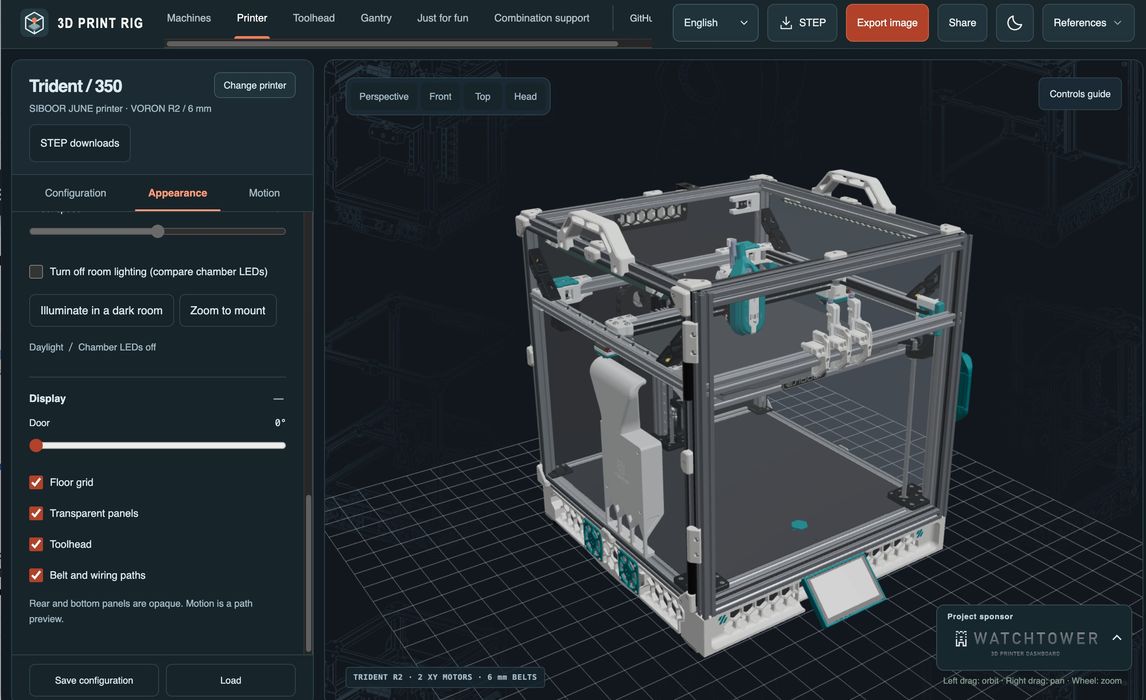
3D Print Rig is an open-source project that can visually build a 3D printer.
You’ve probably used one of the online tools that allow you to pick parts to “build a PC”. These services have all the possible parts and the relationships between them. 3D Print Rig is similar, except it’s for 3D printers.
Well, at least for a certain class of 3D printers. The industry is most definitely heading in the direction of fully built systems direct from a big manufacturer, so this tool is really for DIY folks that want to assemble their own 3D printer using parts they select.
It’s a pretty cool tool, since it shows the system you are “constructing” as you add and modify features. In full, spin-enabled 3D views, too. You can even turn off the “room lights” in the view.
There aren’t that many possible parts. You’re choosing the main gantry, mounting system, toolhead, extruder, cooling system, and a few others. As there aren’t that many vendors providing parts, there are relatively few options for each of these part types. But you can definitely build a 3D printer using this tool. The home page shows quite a few different combinations.
There are panels that focus on the 3D printer as a whole, and others for the toolhead and gantry, so you can get deep into the details.
One thing you cannot do is order the collection of parts you produce, at least not right in the system. Instead, it will create a JSON file with your configuration, and that could be used elsewhere to perform orders. You could, for example, hand it to your AI agent and say “Buy this stuff for me!”
The code is provided on GitHub, so you can try it yourself — or perhaps even use it to build a front end for a proper ordering system. This could be a business opportunity for someone.
Finally, 3D Print Rig is not a service per se; it is software, and you’ll have to find a place to run it. But there is a demonstration site where you can give this service a test.
Via GitHub (Source) and GitHub (Demo)