With the controversy over open-source 3D print slicing software continuing, I thought I’d check on the current state of these tools.
There are plenty of open-source 3D print slicing tools, including PrusaSlicer, BambuStudio, UltiMaker Cura, etc. There are far fewer closed-source tools, and they seem to be fading away in recent years.
There seem to be two major branches of slicing software tools: Cura-based and Slic3r-based. However, most of the action is happening in Slic3r-derived tools.
Years ago, Prusa Research decided to build their slicing software based on Slic3r, as it was one of the leading tools of the day. Prusa Research made the much better PrusaSlicer, which continues to this day.
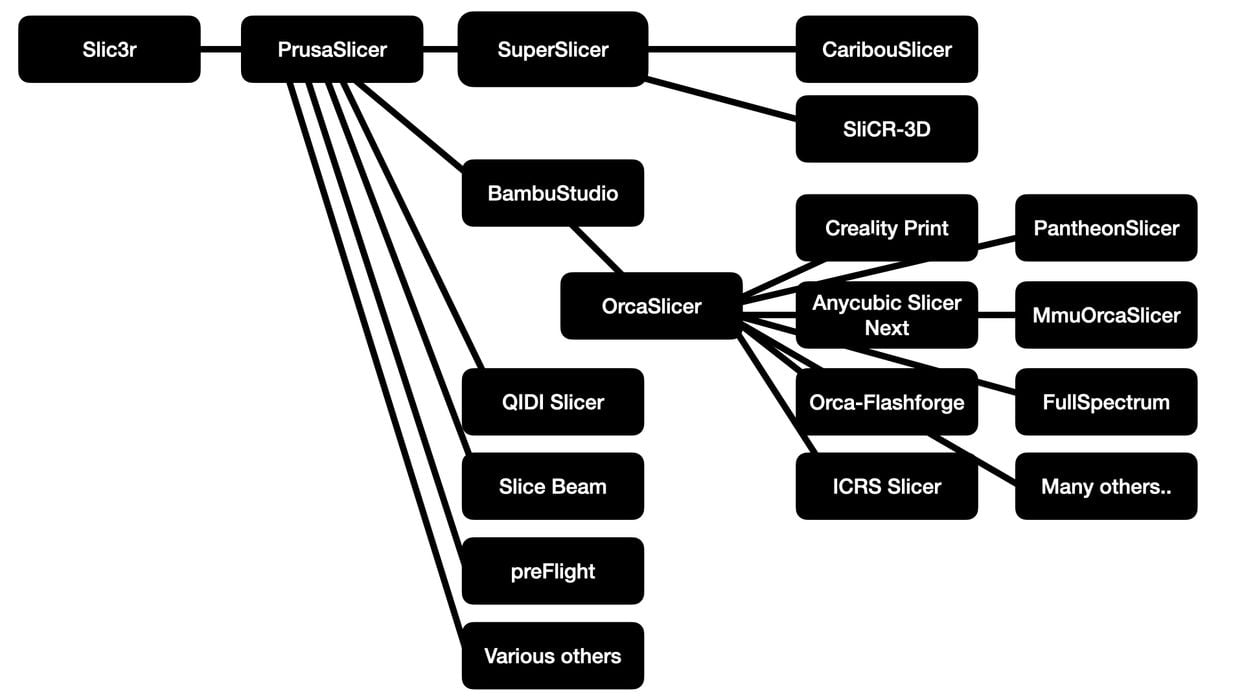
But because of its open-source license, others could take that software and make their own changes and (presumably) improvements. Many have done so. The image at the top shows the current state of Slic3r heritage.
As you can see, there have been quite a few developments. These fall into basically two categories:
- Companies wishing to create some type of custom slicer that works best with their equipment
- Open-source enthusiasts attempting to improve the functional capabilities
Here’s a list of the most notable Slic3r forks:
- Slic3r: Original open-source slicer/toolpath generator.
- PrusaSlicer: The major maintained fork. Originally Slic3r Prusa Edition, now heavily rewritten and expanded.
- SuperSlicer: Community fork adding advanced tuning and calibration features.
- Bambu Studio: Bambu Lab’s slicer for Bambu Lab printers.
- OrcaSlicer: Originally BambuStudio-SoftFever; now a major independent open-source slicer.
- Creality Print: Newer Creality Print line, not the older Cura-derived Creality Slicer.
- Anycubic Slicer Next: Anycubic’s main slicing tool.
- Orca-Flashforge: Flashforge’s Orca-derived slicer for Adventurer/Guider-style machines.
- QIDI Slicer: QIDI’s customized slicer.
- preFlight: oozeBot describes preFlight as building on the Slic3r legacy and as a “spiritual successor to PrusaSlicer”.
- Slice Beam: Android slicer.
- CaribouSlicer: Caribou3D fork for Caribou printers.
- SliCR-3D: CR-3D fork.
- ICRS Slicer: Imperial College Robotics Society fork.
- PantheonSlicer: Pantheon repo specifically for that company’s equipment.
- MmuOrcaSlicer: Fork focused around MMU/multi-material workflows.
- OrcaSlicer-FullSpectrum: Experimental/full-spectrum fork, able to reproduce colour textures.
- Snapmaker Orca / Snapmaker U1 software: Snapmaker’s customized version for their toolchanging system.
Which should you use? I use two methods.
First, if your equipment has a specialized slicer from the manufacturer, use that. Second, if you need specific slicing features, use the tool that includes them. Most times you can shift GCODE around to print on multiple device types, assuming you have the correct print parameters.