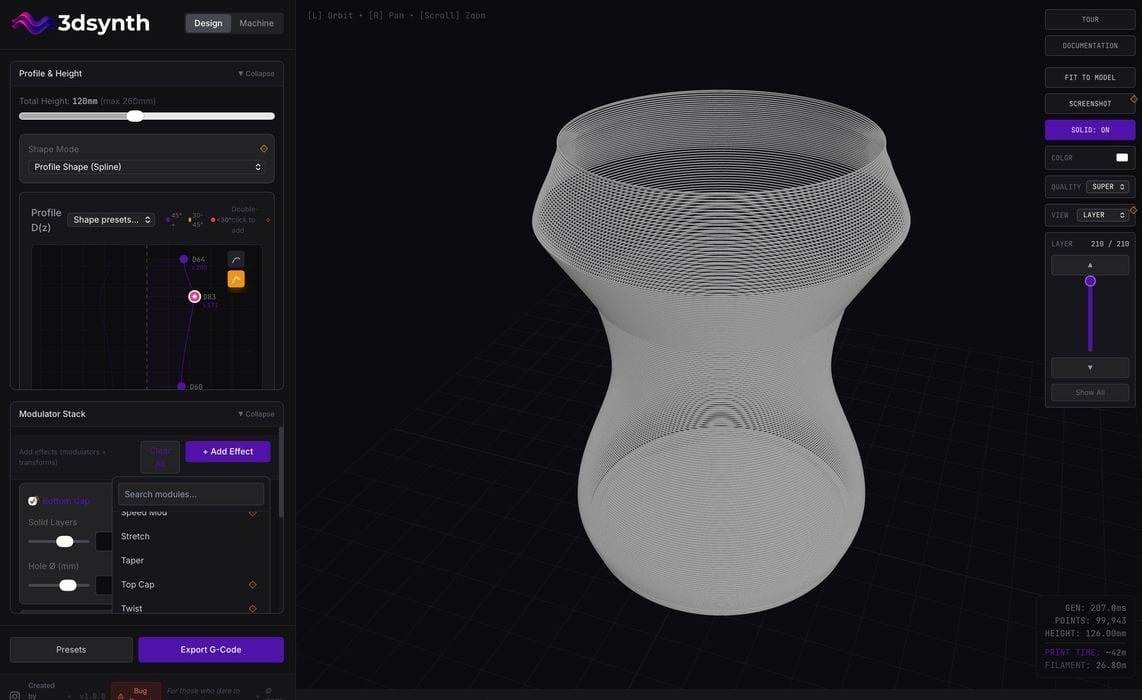
I’m trying a new online tool for 3D Printing, 3Dsynth.
The tool’s purpose is to generate GCODE directly for vase shapes, intended to be printed in vase/spiral mode.
3Dsynth launches with a basic vase shape, which can be swapped for several common options:
- Classic vase
- Cone
- Cylinder
- Funnel
- Hourglass
- Bulb
- Wineglass
- Bowl
One you’ve selected a preset, the shape can then be tweaked by applying any from a long list of “effects”. These include:
- ADSR Envelope
- Bend
- Bottom Cap
- Bump Map Texture
- Extrusion Texture
- Glitch / S&H
- Half Blobs
- Harmonics
- Hole Field
- Line Pattern
- Noise
- Polygonizer
- Radial Blobs
- Shift X/Y
- Speed Mod
- Stretch
- Taper
- Top Cap
- Twist
As you can see, there are quite a few modification types you can apply. I’m not even certain what some of them do!
There’s another really interesting feature: Profile. This is the line that represents the 2D shape of the vase’s perimeter. You can drag points around to change the shape, or introduce hard angles or curves. I have not seen this feature available on other vase generators.
Once you have designed a vase to your specifications, it’s time to export it. Normally you would export STL and then slice it on a suitable slicing tool. However, 3Dsynth is a bit different: it outputs GCODE, not STL.
This means that you have to select a machine profile in 3Dsynth before exporting. Here are the profiles they’ve tested:
- Prusa i3 MK3S / MK3S+
- Prusa MINI / MINI+
- Creality K2
- Creality K2 Pro
- Creality K2 Plus
- Bambu Lab X1 Carbon
- Bambu Lab P1S
- Bambu Lab P1P
- Creality Ender 3 (V2 / Pro / base)
- Creality Ender 3 V3 / V3 SE / V3 Plus
- Creality Ender 5
- Creality CR-10
- Creality CR-10 S5 / large-format CR series
- Anycubic i3 Mega
- Anycubic Kobra / Kobra-S type
- Anycubic Kobra-Max (large bed variant)
- Voron 2.4 (core-XY DIY kit)
That covers most of the recently popular systems, and in many cases you can just select a similar machine and it might work. You can also tweak the speeds and temperatures.
After export, you simply drag the GCODE file into your slicing tool and “print”. There is no need to slice the file at all.
The tool works quite well, and is very easy to use. I believe anyone could use it to design unique vase for 3D printing.
3Dsynth is a paid service, but there is a free option. The free level includes everything, but locks out many of the advanced effects. However, you can still design very competent vase models with it. The paid version requires a one-time payment of €39 (US$46) for a lifetime of use. This is quite different from every other service that requires an ongoing monthly fee, so it’s a pretty good deal.
If you’re looking for an easy way to generate unique 3D printable vases, 3Dsynth is a good option.
Via 3Dsynth