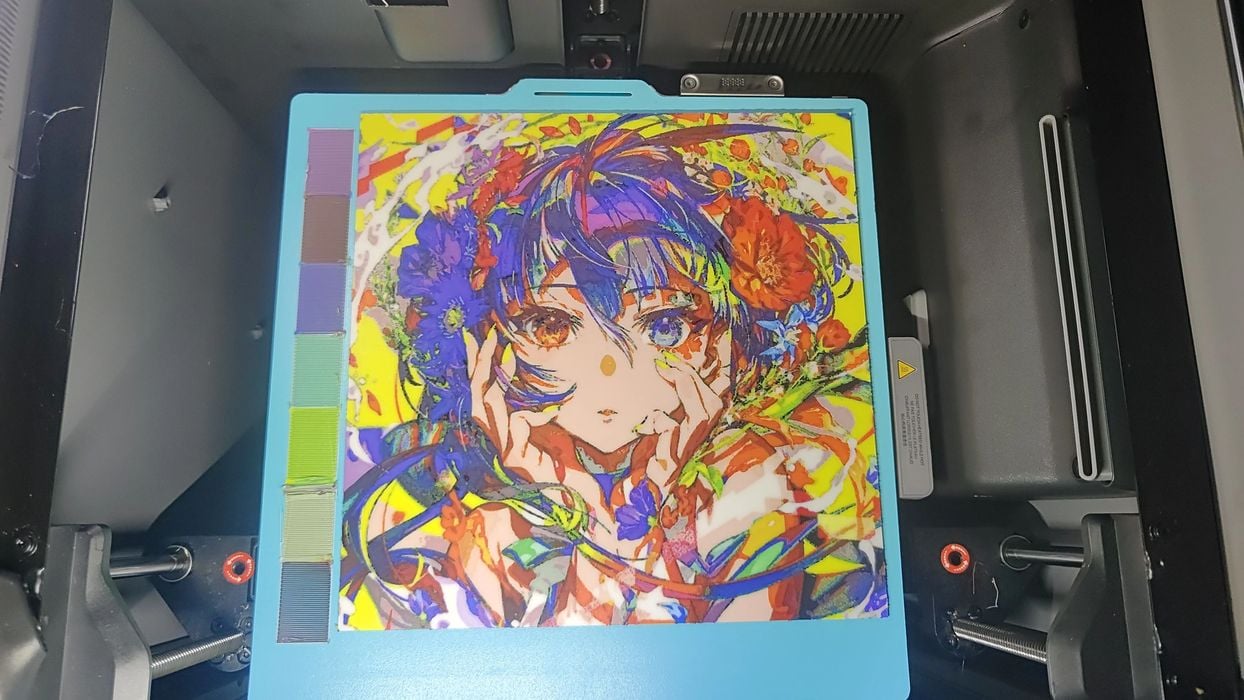
Lumina Studio provides an easy way to achieve accurate, full multicolor 3D prints.
There’s been quite the development of colour in FFF 3D printing over the past year, starting with the introduction of Full Spectrum. That tool enables printing an object with more colours than are loaded in your 3D printer.
It does so by leveraging the optical effect of layering different colours together. For example, a white layer over black might produce gray. In theory, you can produce almost any colour if you have the correct base colours loaded.
Full Spectrum and similar tools use colour theory to generate the colours, but a new tool, Lumina Studio, uses a different approach to produce the colours: vision.
Here’s how it works:
- Print Calibration Plates: these are flat prints with “thousands” of colour combinations, printed with the exact filaments you have available.
- Photograph and Extract: Capture and upload images of the calibration plates, and a vision system figures out the actual RGB values for each combination.
- Convert: Apply the calculated RGB colour mappings to a 3D model and generate a suitable 3MF file.
- Print: Print the generated 3MF model using your normal slicer and filaments.
They describe the system as “closed loop”, and it really is: the generated colours are based on the actual filaments you have in your 3D printer.
Typically, this would be used to generate colours for a flat 3D print of a colour image, where the colours are mapped with Lumina Studio.
Six modes are possible with Lumina Studio:
- Four colour RYBW (Red, Yellow, Blue, White)
- For colour CMYW (Cyan, Magenta, Yellow, White)
- Six colour
- Eight colour
- Monochrome (grayscale)
The eight colour mode is able to generate “thousands of colours”.
Lumina Studio is an open-source product and is free to download and use. The source and downloadable modules can be found on GitHub, and there’s an extensive Wiki that will guide you through using the tool.
This is an interesting development and one that seems quite practical: it uses the filament you have to calibrate generated colors. It is unlike the other multicolor tools and should be something those with multicolor 3D printers should test.
Via GitHub and Lumina Studio