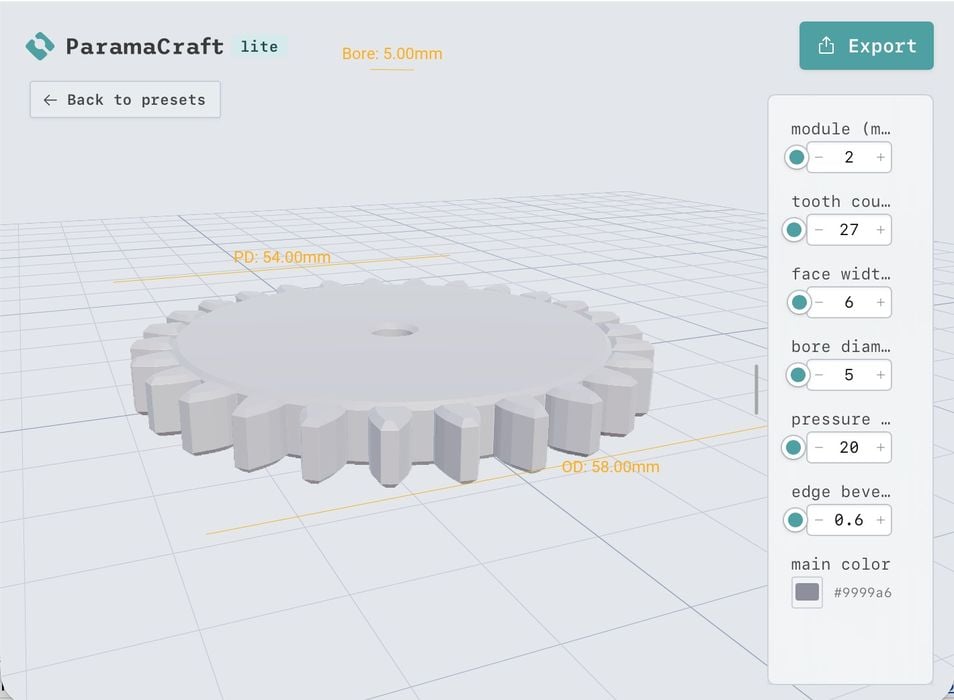
Bambu Lab added a new feature to their MakerLab section: ParamaCraft Lite.
MakerLab is the company’s experimental area where they publish tools of various kinds to make and modify 3D models. Some of the tools are really quite interesting, but this week they added a new one, ParamaCraft Lite.
It’s “lite” because it is a constrained version of the full tool from ParamaCraft. What does it do? Bambu Lab explains:
“ParamaCraft Lite is a free tool for customizing parametric 3D models. It’s quick and intuitive: drag the sliders to adjust the size, shape, and even the surface patterns until the model is exactly what you want. The preview updates as you drag, so you can see how it’ll look before you print. When you’re happy with it, export a print-ready file and send it to your 3D printer. The same model can look completely different depending on the settings, so it’s easy to make something that’s one of a kind.”
Parametric simply means that the dimensions and other parameters of components of a 3D model have numerical values. The idea here is to fiddle with those numbers, which cause a change in the object’s final shape.
After launching the tool, you are presented with a long list of “base models” that can be tweaked. There are all kinds of items, ranging from vases to phone cases to baskets and much more.
It’s not clear exactly how many base models are available, as you are continually presented with a “load more” button at the bottom. I got up to around 400 items, and there were still more to come. Suffice it to say that there are a lot of base models here. There is no explicit search function, but you can constrain the list by clicking on a short list of premade tags.
Each model has a different list of parameters to tweak, as you might expect. This is why there is not an ability to upload new models: they have to be set up with unique parameters.
For example, the gear model shown at the top has six possible tweaks that can adjust the geometry of the 3D model.
After adjusting the parameters to dial in the model you want, you hit “export” to download it. There are a couple of steps required, however. First, you must “generate” the 3D model’s mesh, and you have to select the desired resolution (high, normal, or low).
Finally, you hit “Export” again to get the file. However, here you are required to specify the Bambu Lab machine and nozzle diameter to proceed, even if you don’t have such a machine. You then get a choice of STL or 3MF as the final output file format.
This is a fairly useful tool, especially for those not able to use CAD tools to develop their own 3D models. Many common items can be found in the list, so instead of having to design them from scratch or somehow find them in a 3D model site, ParamaCraft Lite allows you to make what you need with only a few clicks.
And best of all, it is available at no charge.
Via MakerLab