It’s been a while since I looked at Tinkercad, but it seems there have been some updates.
The online tool is extremely popular as an entry-level 3D CAD tool. While most of the current CAD tools are either expensive or very challenging to learn (or both), Tinkercad provides a simple visual paradigm for building 3D models.
Tinkercad doesn’t even require a heavy PC to run, as it can be run as a web app on almost any platform that has a browser.
Because of these properties, Tinkercad has become quite popular. I am constantly amazed by people in unexpected areas using Tinkercad to produce parts for their operations. I know of one person 3D printing for a business that uses Tinkercad to quickly design custom parts for their operations, for example. I’m sure he isn’t the only one.
However, I use more advanced tools and haven’t looked at Tinkercad for a while. I did take a look this week and discovered they had done some updates. That’s what happens with online tools — they get quietly updated now and then.
What’s been updated this year? I looked back at their site and found several interesting new features.
One is scale. They’ve changed the maximum size for building from 1000 x 1000 x 1000 units to 2000 x 2000 x 2000 units. This enables either larger or more detailed prints, depending on what you want to do. You can use the new scale options (1:10, 1:100 and 1:1000) to adjust for real-world units. They also added centimeters, meters and feet as measurement units to accommodate larger designs.
Here’s their definitions of the scale factors:
- 1:1 – Designing something to print on your 3D printer.
- 1:10 – Designing something the size of a desk that the 3D printer sits on.
- 1:100 – Designing something the size of your room or house.
- 1:1000 – Designing something the size of your neighborhood.
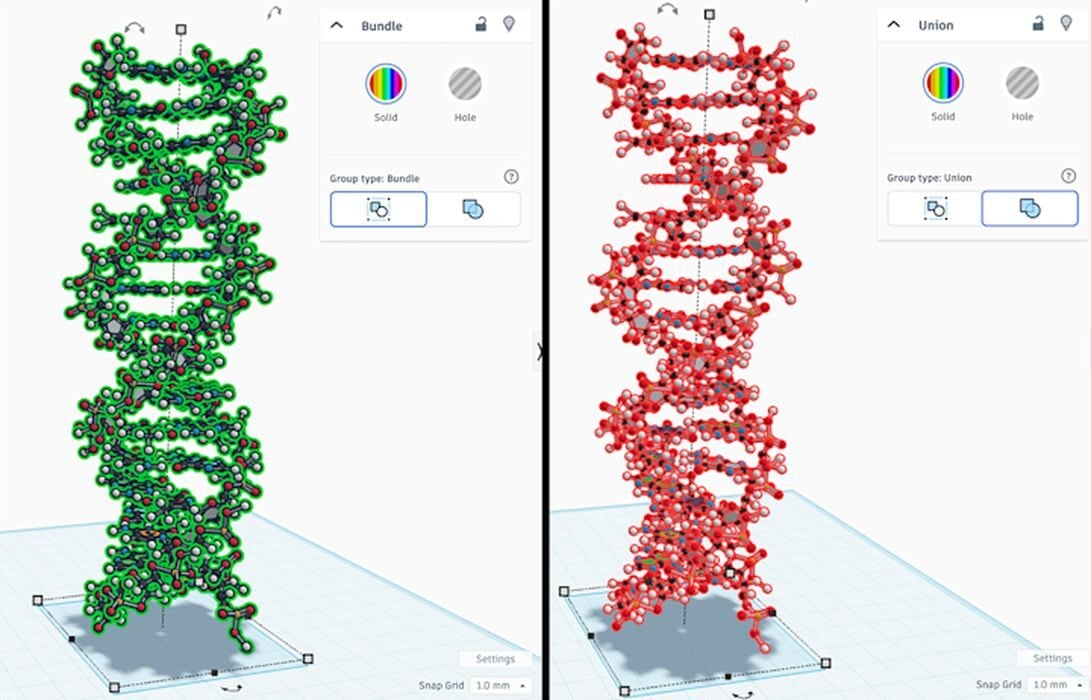
Another new feature this year is “bundle groups”. They are similar to the existing “union groups”, which are used for boolean functions, except instead they are used for quickly dealing with groups of objects. For example, if you want to move, scale, or rotate a bag of objects, you can make a bundle group and do it all at once.
A big update was Sketching. Sketching is the key to starting most CAD projects in advanced tools, and now you can do so in Tinkercad, too.
The sketch tool allows the user to draw 2D shapes that can later be extruded or rotated into 3D geometry.
It seems that over time Tinkercad has grown much more powerful, and apparently the development team is not slowing down. They say they have plenty of plans for future enhancements, and that’s a good thing.
If you’re a 3D printer operator and want to try designing your own objects, Tinkercad is an excellent place to start your 3D design journey.
Via Tinkercad